
Welcome to TraderLobby
Understand what TraderLobby does, how Paper and Live differ, where everything is, and the safest way to begin.
TraderLobby is a workspace for learning about automated crypto trading, evaluating strategies in a simulation, and—when you deliberately enable supported Live features—directing those strategies to place orders through an exchange account you own.
TraderLobby in 60 seconds
You do not need to understand every chart or trading term before opening the app. Start with this sequence:
- Learn the workspace
Use this guide, the App tour, and Learn to understand labels and safety controls before changing anything consequential.
- Practice in Paper
Observe simulated decisions, candidates, positions, and exits. Paper is for learning and evaluation, not predicting exactly what a Live account would have earned.
- Choose deliberately
Review a strategy’s purpose, evidence, price, recommended position slots, and controls. A high historical result alone is not a reason to enable it.
- Connect only when ready
If you choose Live, connect a supported exchange with a dedicated, minimum-permission API credential. TraderLobby never needs withdrawal permission.
- Set boundaries first
Select the intended Live account, validate order permissions, choose an affordable trading budget, and review each strategy’s Live settings.
- Monitor and verify
Watch positions, activity, fees, and warnings. Confirm final Live balances, accepted orders, fills, and provider fees in your exchange account.
What TraderLobby is—and is not
TraderLobby brings strategy discovery, Paper evaluation, customer-directed Live automation, account activity, community tools, and guided learning into one interface. It helps you organize decisions and observe what the software is doing. It does not take ownership of your funds or remove the uncertainty of trading.
| TraderLobby is | TraderLobby is not |
|---|---|
| Software that can display provider-reported account information and, where supported and enabled, send authorized order requests | An exchange or custodian that holds your cash or crypto |
| A place to evaluate strategies, settings, historical evidence, Paper behavior, and Live activity | A promise that a strategy will be profitable or reproduce a historical result |
| A customer-controlled workspace with budgets, position slots, mode selection, pause controls, and confirmations | A substitute for understanding the permissions, risks, fees, taxes, and rules of your exchange account |
| An educational and operational product | A broker-dealer, investment adviser, or source of personalized financial advice |
What you can do in TraderLobby
Your available menus and controls can vary with your account, subscription, role, location, connected provider, and completed safety checks.
- Learn at your own paceUse Basics, Medium, Pro, How This App Works, and Play to build product and trading vocabulary. Lessons are educational, not trade recommendations.
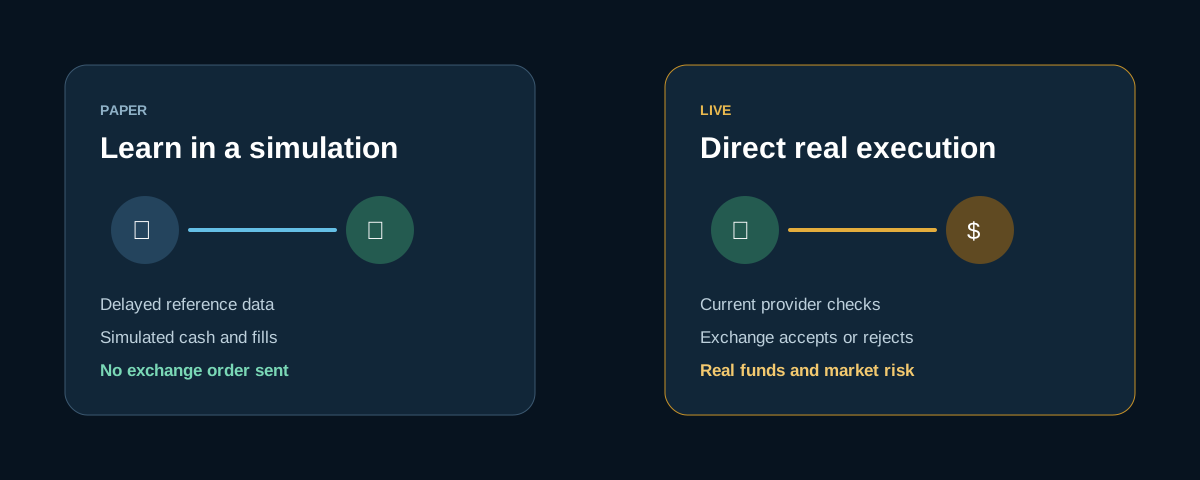
- Practice in PaperUse delayed reference data and simulated funds to explore entries, positions, exits, and reports without sending exchange orders.
- Explore strategiesBrowse TraderLobby Originals and eligible community strategies, compare purpose and evidence, subscribe when required, and add them to Paper or Live.
- Set strategy boundariesControl concurrent position slots, capital allocation, and whether a decision engine may open new positions. Disabling new decisions does not automatically sell a holding.
- Read the trading workspaceFollow strategy cards, eligible candidates, the coin universe, positions, recent fills, exit proximity, portfolio values, and trading state.
- Connect supported providersAdd eligible credentials, select a trading currency, set maximum cash, refresh balances, and validate order permissions separately from connectivity.
- Direct supported Live executionWhen the account, provider, permissions, and strategy are eligible, Live can send real order requests. You remain responsible for supervising and pausing activity.
- Review and reconcileUse Transactions for orders and fills and Reporting for period-based results. Use your exchange as the final Live record.
- Participate in CommunityUse permitted channels, forums, profiles, saved posts, activity, and direct messages. Community discussion is not verified financial advice.
- Create when eligibleCreator accounts can publish customer-visible strategy information, manage updates, and review creator analytics and billing features.
The simple mental model
TraderLobby turns market context and customer-visible strategy settings into observable activity. Proprietary decision logic remains private, but the workflow around it should not feel like a black box.
- Market context arrives
TraderLobby receives data appropriate to the workspace. Paper uses its disclosed delayed reference; Live decisions and order checks use current provider data.
- A strategy evaluates eligibility
It considers supported markets and its private decision rules together with your settings and applicable safety controls.
- A candidate may appear
A candidate is under consideration, not a promised order. Cash, timing, ownership, slots, permissions, or other conditions may prevent an entry.
- Paper simulates or Live requests
Paper records a simulated action. Eligible Live execution sends a request to the selected exchange, which accepts or rejects it.
- The workspace records the result
Positions, fills, fees, strategy attribution, warnings, and reports help explain what occurred and what remains open.
- You keep supervising
You can inspect activity, pause automation, change eligible settings, or take a supported manual action. Switching workspaces alone does not stop Live automation.
Who controls what
Live trading involves three separate systems of responsibility. Knowing the boundary tells you where to verify a result and where to troubleshoot.
| Area | You | TraderLobby | Exchange or provider |
|---|---|---|---|
| Account and funds | Own the account and decide what funds are available | Does not take custody | Holds the account, assets, and authoritative balance records |
| API access | Create the credential and choose permissions | Stores supported credentials securely and uses allowed access | Defines and enforces credential permissions |
| Strategy participation | Choose, subscribe, configure, enable, disable, or remove | Displays controls and evaluates supported instructions | Does not choose TraderLobby strategy settings |
| Capital boundaries | Choose maximum cash and strategy allocation | Applies customer-visible budget and allocation controls | Enforces balance, account, product, and market limits |
| Live execution | Choose whether to connect and enable eligible Live behavior | Sends supported requests and records returned status | Accepts or rejects requests and determines final price, quantity, fill, and fee |
| Supervision | Monitor and pause when something is unclear | Shows status, positions, fills, warnings, and pause controls | Provides the final Live account and order record |
Paper and Live at a glance
The mode selector changes the workspace you are viewing. Moving from Live back to Paper does not automatically pause enabled Live strategies or their position watchers.
| Question | Paper | Live |
|---|---|---|
| Can it send an exchange order? | No. Entries and exits are simulated. | Yes, when provider, account, permissions, strategy, and safety checks support submission. |
| What money does it use? | Simulated cash and positions. | Real assets in the connected exchange account selected for Live. |
| What data does it use? | Disclosed delayed reference data. The current app identifies a 45-minute Coinbase reference delay. | Current provider data for decisions and order checks; availability and timing depend on the provider. |
| Who determines the fill? | The Paper simulator applies simulation assumptions. | The exchange accepts or rejects the request and reports final execution. |
| What is it best for? | Learning, observing behavior, and testing configuration. | Customer-directed execution after readiness, permission, and budget checks. |
| What can differ? | Paper cannot fully reproduce liquidity, spread, slippage, outages, rejections, or fees. | Real price movement, provider rules, fees, partial fills, rejections, and losses apply. |
Read the complete Paper and Live guide →
Tour the customer workspace
The layout adapts to screen size, and some controls appear only when your account is eligible. These customer jobs remain the organizing structure.
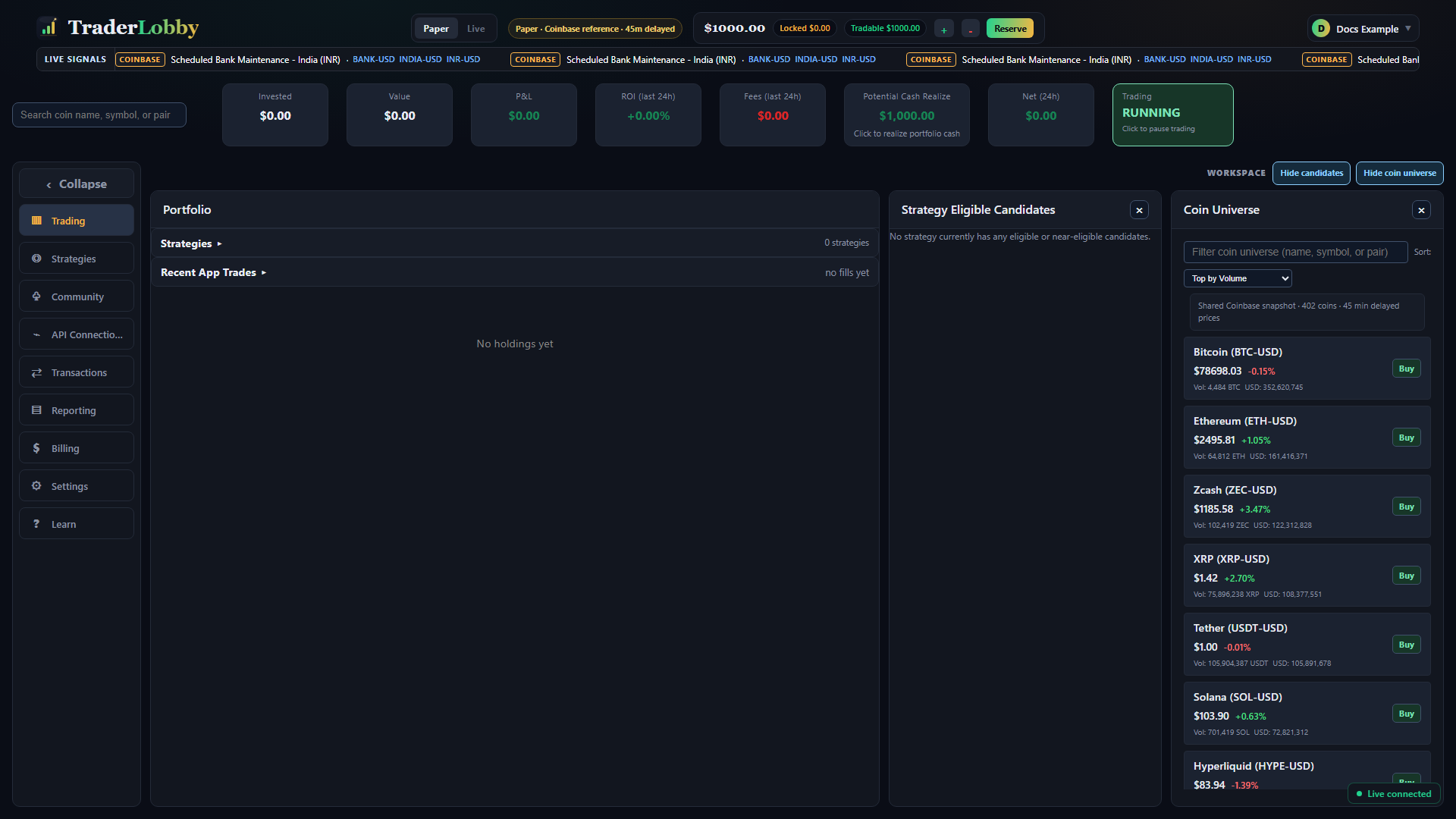
| Region | What it helps you understand |
|---|---|
| Paper / Live selector | Which workspace you are viewing. Confirm it before an action that could affect real funds. |
| Account summary | Invested amount, value, profit and loss, cash context, fees, and whether trading is running or paused. |
| Trading | Active strategies, candidates, app-attributed positions, recent activity, and exit context. |
| Strategies | Available strategies, access, evidence, subscriptions, and Paper or Live settings. |
| Community | Permitted discussions, channels, messages, people, profiles, saved content, and activity. |
| API Connections | Connected providers, balances, budgets, connectivity, and separate order-permission validation. |
| Transactions | App-attributed orders, fills, fees, statuses, and provider responses. |
| Reporting | How activity adds up across a period, workspace, strategy, or eligible creator view. |
| Billing | Strategy subscriptions and eligible creator billing tools. Billing controls do not close exchange positions. |
| Settings | Language, appearance, security, support, notifications, and account controls. |
| Learn | Guided lessons, progress, and Play experiences about crypto and the application. |
Choose your path
You do not have to read the whole site in order. Start with what you want to accomplish today.
Your safest first session
A useful first session is about orientation, not speed. Keep real funds out of the process while you learn where decisions and records appear.
- Confirm Paper is selected
The Paper label and delayed-reference notice should agree.
- Open the App tour
Locate the main menus, trading state, account summary, and support path.
- Review one strategy
Read its purpose, evidence, source, cost, recommended slots, and availability—not just one return number.
- Configure it only in Paper
Start with one strategy and a simple setup so its candidates, positions, and decisions are easier to follow.
- Observe rather than optimize
Watch the strategy card, candidate panel, positions, fills, and exit information. Learn what normal waiting looks like.
- Connect the records
Use Transactions to answer “what happened?” and Reporting to answer “how did it add up?”
- Stop with Paper
Do not connect an exchange or enable Live until you separately complete Live readiness and API-key safety.
Essential vocabulary
| Term | Plain-language meaning |
|---|---|
| Paper | A simulated workspace using delayed reference data and simulated cash, positions, and fills. It sends no exchange orders. |
| Live | A workspace that can use current provider data and, when requirements pass, send real order requests to a connected exchange. |
| Strategy | A defined decision process with visible purpose, evidence, access, and settings. Proprietary entry and exit logic is not published here. |
| Candidate | An asset a strategy is considering. It is not an order and may never become a position. |
| Position | An app-attributed holding that remains open. In Live, compare it with the authoritative exchange holding. |
| Order and fill | An order is a trade request. A fill is the quantity and price reported as executed. One order can have zero, one, or multiple fills. |
| Position slot | One unit of allowed concurrent holdings. Used slots can include app-attributed or in-progress states even when tiny holdings are hidden. |
| Trading budget | The maximum connected-account cash TraderLobby may use. It is a ceiling, not a target or promise to invest that amount. |
| Reserve | Provider-reported cash kept outside the current trading budget or otherwise unavailable to new app-directed entries. |
| Tradable cash | The amount currently eligible for supported new entries after relevant balance and customer controls are applied. |
Safety principles to keep
- Confirm the modeCheck Paper or Live before every strategy, connection, or order action.
- Begin with observationUse Paper long enough to understand normal waiting, entries, positions, exits, and reports.
- Use minimum permissionsCreate a dedicated credential. Enable only requested read and trading permissions, never withdrawals.
- Choose an affordable limitKeep a new connection at zero through validation, then raise it only to an intentional amount.
- Verify consequential resultsUse your exchange as the final source for Live balances, accepted orders, fills, and fees.
- Pause when uncertainDo not repeat an action or relax a safety control until you understand the warning or error.
Get help and continue
If a label, warning, balance, or result is unclear, stop before changing a Live control. Search using the exact words shown on screen. Troubleshooting starts with common symptoms; the Safety checklist covers account and credential protection.
When contacting support, describe the page, selected mode, provider, action, time, and exact non-secret error. Never include passwords, passkeys, verification codes, API secrets, private keys, or complete credential identifiers.