
Connect an exchange safely
Add a supported provider without giving TraderLobby withdrawal access.
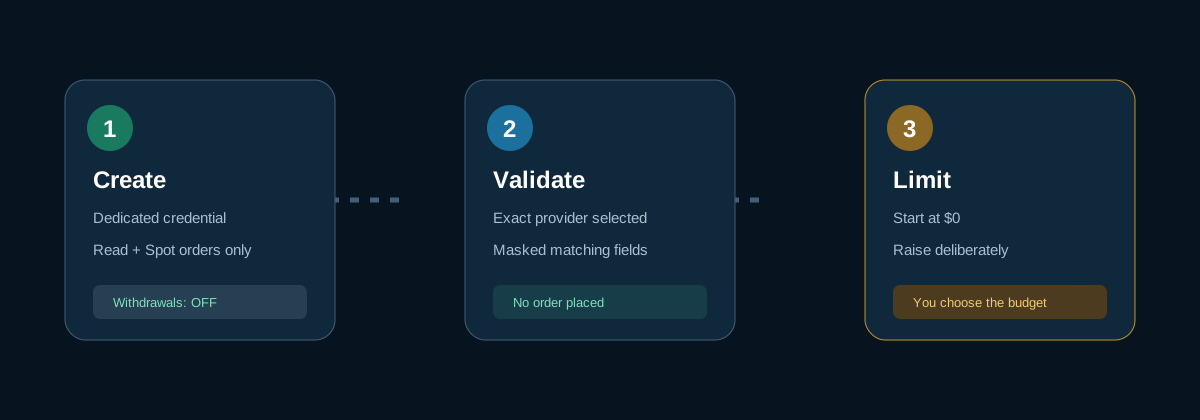
Before you begin
Use an exchange account that belongs to you and is eligible in your location. Provider availability and API features differ by country and account.
- Choose the exact provider
In API Connections, select the exchange product that matches your account. Binance.com and Binance.US are different providers. Robinhood Crypto is for eligible U.S. customers.
- Create a dedicated API credential
Follow the provider’s own account settings. Give it read and spot-order permissions only when TraderLobby asks for them. Never enable withdrawals.
- Enter the matching fields
Paste the public identifier and secret or private key into their labeled TraderLobby fields. Secrets remain masked.
- Start with a zero budget
Validate and save first. Set Maximum cash TraderLobby may use to 0 until validation and order-permission checks pass.
- Validate order permissions
Use the separate validation on the saved connection card. It checks the provider without placing an order.
- Set a deliberate cash limit
Increase the budget only to an amount you are prepared to use for Live strategy entries.
Provider notes
| Provider | Important distinction |
|---|---|
| Coinbase Advanced | Use an Advanced Trade-compatible credential with the displayed permissions. |
| Binance.US | For eligible U.S. accounts; do not select it for a Binance.com credential. |
| Binance.com | For eligible accounts outside the U.S.; connectivity may use TraderLobby’s regional gateway, but your account and permissions still control eligibility. |
| Robinhood Crypto | Requires an Ed25519 key pair and a Robinhood-created API credential for eligible U.S. customers. |
| Kraken or Gemini | Availability and order support are shown on the saved connection card. |